
Introductory example to using GPry#
Step 1: Setting up a likelihood function#
Let’s start with a very simple example where we want to characterize a 2d-Gaussian Likelihood:
with \(\boldsymbol{\mu}=\pmatrix{3\\ 2},\ \Sigma=\pmatrix{0.5 & 0.4 \\ 0.4 & 1.5}\).
We need to define a log-likelihood function, which is the modelling target for GPry:
import numpy as np
from scipy.stats import multivariate_normal

mean = [3, 2]
cov = [[0.5, 0.4], [0.4, 1.5]]
rv = multivariate_normal(mean, cov)

def logLkl(x, y):
    return rv.logpdf(np.array([x, y]).T)
with a uniform prior square in \([-10, 10]\)
bounds = [[-10, 10], [-10, 10]]
Step 2: Creating the Runner object#
The Runner manages model specification and the active sampling loop of GPry up to convergence, as well as allows for some post-processing and tests.
To initialise it, we pass it the log-likelihood function as first argument, and the prior bounds via the bounds keyword. <ore complicated prior specifications can be used by defining and passing as first argument a Cobaya model (see Running with Cobaya).
Optionally, we will also pass a path to save checkpoints via the checkpoint argument. If passed, in order to prevent loss of data, you must decide a checkpoint policy (either "resume" or "overwrite"). If set to "resume" the runner object will try to load the checkpoint and resume the active sampling loop from there; if set to "overwrite" it will start from scratch and overwrite checkpoint files which already exist.
from gpry.run import Runner
checkpoint = "output/simple"
runner = Runner(logLkl, bounds, checkpoint=checkpoint, load_checkpoint="overwrite")
In this example we will leave all training parameters (the choice of GP, acquisition function, convergence criterion and options of the active sampling loop) as default.
Step 3: Running the active learning loop#
Since all training parameters are chosen automatically all we have to do is to call the
run function of the Runner object:
runner.run()
This will run the active sampling loop until convergence is reached. It also saves
the checkpoint files after every iteration of the bayesian optimization loop and creates
progress plots which are saved in [checkpoint]/images/ (./images/ if checkpoint is
None).
Once converged, you can access the surrogate model and use it as a function for any purpose.
Note
Internally GPry models the log-posterior, not the log-likelihood and that you need to hand GPry a single (nsamples, ndim) with the locations where you want to evaluate the surrogate.
To get the surrogate log-posterior or log-likelihood you can call either Runner.logp or Runner.logL
Let us compare GPry and the likelihood in the location (1, 2):
point = (1, 2)
print(f"Log-lkl at (1,2): {logLkl(*point)}")
print(f"surrogate at (1,2): {runner.logL(point)[0]}")
Both evaluations should produce similar numbers.
Step 4: Running a Monte Carlo sample on the final surrogate model#
The Runner object can also run an MC sampler on the GP in order to extract marginalised quantities. To do that, we use the generate_mc_sample method of the Runner. Leaving all option to their default, it will use the same sampler as for the active learning
runner.generate_mc_sample()
Samples are by default stored in the same folder as the checkpoint, inside a chains sub folder. They are stored as an attribute of the Runner and can be retrieved with the last_mc_samples() method.
Bonus: Plotting the results#
Now that we have MC samples you can process and plot them the same way that you would do with any other MC samples.
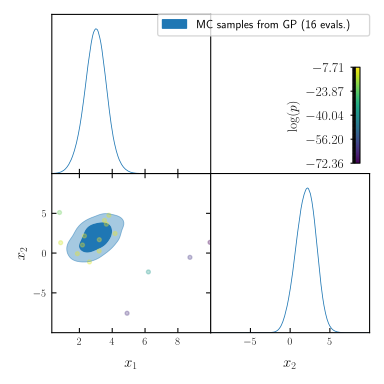
The easiest way to get a corner plot though is to call the plot_mc method of the Runner object which will generate a GetDist corner plot.
It includes the training set unless passed add_training=False.
runner.plot_mc(updated_info, sampler)
Bonus: Getting some extra insights#
You can do further plots about the progress of the active-learning loop using:
runner.plot_progress()
If you call this method without any arguments it results in the following plots:
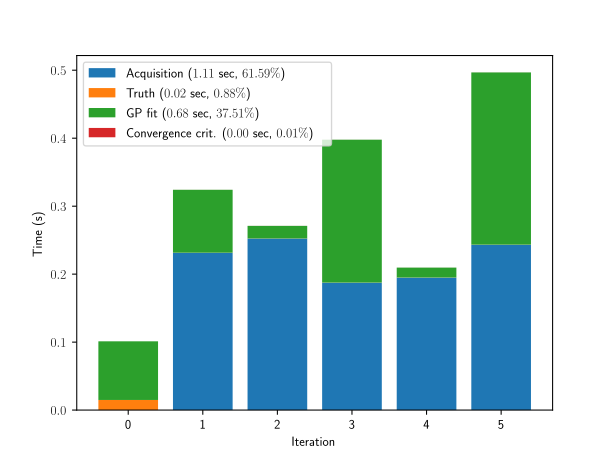
a histogram of the distribution time spent at different parts of the code (timing.png)
the distribution of the training samples (trace.png)
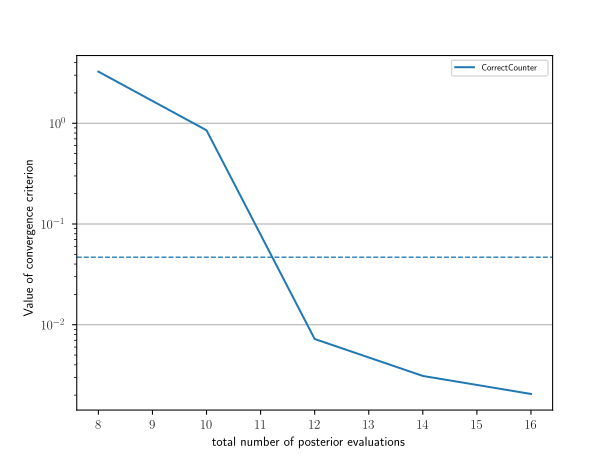
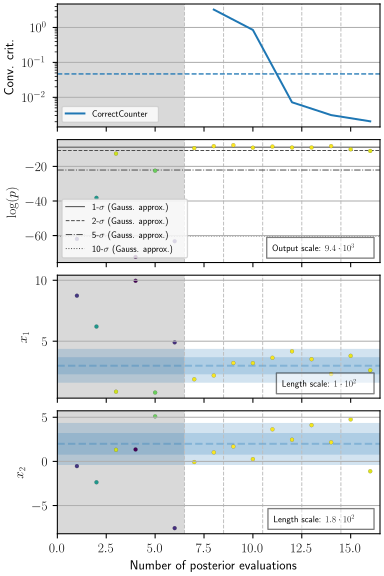
A plot showing the value(s) of all convergence criteria as function of the number of posterior evaluations (convergence.png). The upper part of this plot shows the convergence criterion, the second from the top the distribution of posterior values over time, and the rest of them the distribution of samples per model parameter. The blue bands in these parameter plots represent the 1-d marginalised posterior obtained with the MC sampler, and won’t appear if
runner.plot_progressis called before generating an MC sample. If the training points were not centred around the blue band, the run has not converged correctly. In this case, see Strategy and troubleshooting for tips on fixing this issue.
Validation#
Note
This part is optional and only relevant for validating the contours that GPry produces. In a realistic scenario you would obviously not run a full MCMC on the likelihood and will need to follow the validation guidelines at Strategy and troubleshooting.
Lastly we compare our result to the original gaussian:
# The parameter names need to be the same as for the log-likelihood function
from getdist import MCSamples
samples_truth = MCSamples(samples=rv.rvs(size=10000), names=["x_1", "x_2"])

runner.plot_mc(add_samples={"Ground truth": samples_truth})
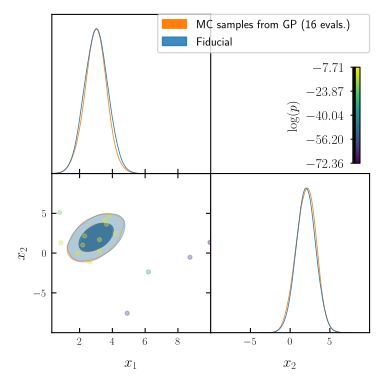
As you can see the two agree almost perfectly! And we achieved this with just a few evaluations of the posterior distribution!
The code for the example is available at ../../examples/introductory_example.ipynb and ../../examples/introductory_example.py